
Playing in tournaments
How to find an event, register, check in, survive the match lobby's map draft, play your series, and get results recorded, plus brackets, the spectator screen, and where the replays end up.
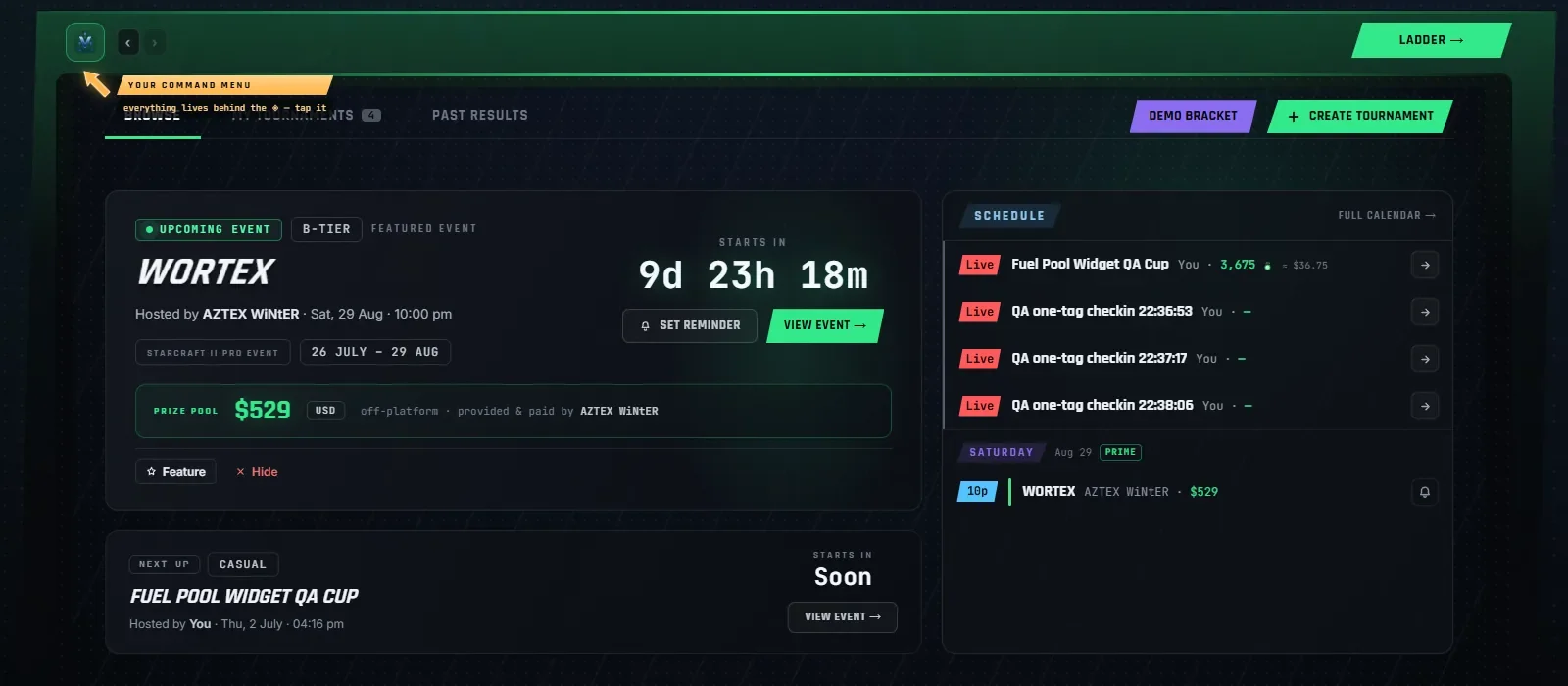
The Tournaments hub lives in the Compete area. The hub itself is at /#/tournaments, with three tabs: "Browse", "My tournaments" (invites show up here as a count chip), and "Past results". Browse carries a featured hero for the headline event, a schedule rail, the circuit list with "Open to join" / "Upcoming" / "Past results" segments, tier filters, and a search box.
A navigation quirk: entering Compete from the lanes lands you on the ranked War Room, because that is the screen most players want daily. The Browse hub is one click away, or direct via /#/tournaments.
Registering#
Open an event and hit "Join". Public events are open to anyone signed in; invite-only events need an invite (they do not even appear for outsiders). If the organizer added you by name without an account, they can later match that placeholder to your profile.
While you are registered, the "Live now" panel (top right of the site) tracks your events: check-in windows, match soon, your match live. You will not miss a round because you were browsing another tab.
Check-in#
Events can require check-in before start. The button appears on the event page inside the window the organizer set ("Check in" turns into "Checked in").
Check-in asks you to confirm your game account with a modal titled "Confirm your game account": your battletag in the exact Name#1234 form, for at least one region (Americas, Europe, Korea). This is how Vespene reads your uploaded match replays and records results automatically. If your match later lands on a region you did not provide, it prompts you to add it, but never blocks you from playing.
The match lobby and the Map Draft Arena#
When your match is ready you get a takeover alert ("Your match is ready") with a short countdown, then the lobby. Most events use the fullscreen Map Draft Arena:
- A phase strip walks Ban ▸ Pick ▸ Server ▸ Ready ▸ Live. Depending on the event's rules some phases are skipped (a fixed-server Bo1 with auto map order collapses to Ban then Live).
- Turn prompts are explicit: "Your turn" with the ban or pick it wants, "Waiting on opponent" otherwise. A shot clock counts your turn down and turns red near zero. Organizers can hold, extend, or release the clock.
- The left player is blue, the right player is red. Banned maps get a stamp; an unowned pick shows as the purple DECIDER.
- After maps are locked, the ready check runs, and the lobby posts hosting orders: both players click Ready, then the named host creates the SC2 custom lobby and invites the opponent. The SC2 invites card carries your opponent's battletag with a copy button. Set your own battletag in your profile or the host cannot invite you.
- Lobby chat is private to the players, the organizer, staff, and approved casters. The "Call admin" button pings the organizer with a one-click link straight into your lobby; use it the moment something is stuck instead of waiting out a timer.
A pop-out mini lobby ("Pop out") keeps a floating read-only view while you browse the rest of the site, and nudges you when it is your turn.
Playing and reporting results#
Play the series in StarCraft II as instructed by the lobby. Results converge from several sources, and all of them end in the same place:
- Replay upload: drop the
.SC2Replayon the match page ("Drop a .SC2Replay here"). The winner is detected from the replay and the game is marked auto-verified. - Companion auto-upload: if you run the desktop Companion, your replay uploads itself when the game ends, and the match usually resolves before you are back at the score screen.
- Manual report: "or report manually" with a winner (and optionally map and duration). Manual reports start unverified until the opponent's report or a replay agrees.
- Organizer entry: staff can enter or correct any game, award a walkover for a no-show, or undo a result before the next round is played. Some events are configured "manual results only", and the match page says so.
If reports disagree or a replay looks wrong (wrong map, started before ready, already used for another match), the game is flagged for review instead of silently trusted. Use "Dispute match" if you need a human.
Brackets and spectating#
The bracket is a pan-and-zoom canvas: drag to pan, scroll to zoom, hover a match for details, click to open it. Double elimination renders "Winners Bracket", "Losers Bracket", and "Grand Final" bands; group events render "Group Stage" and "Playoffs". A "UB +1" badge on the grand final means the winners' champion starts the series a game up instead of a bracket reset.
Spoiler safety is built in. "Hide results" flips the whole bracket to spoiler-safe mode, and organizers can embargo results entirely until they publish.
The "Stream" tab is the spectator screen: the organizer's Twitch embed (or "No stream linked"), a bracket strip, an "Up next" card, and tournament chat. Posting in tournament chat is limited to the organizer, staff, players, and approved casters; everyone can read.
When it is over, the recap page is the victory console: champion hero, the run, final standings, prize payouts in Minerals, and share links.
Where the replays go#
Every tournament game played through the lobby system can carry its replay:
- Per-game replay buttons open the game straight in the Vespene replay viewer (the Vespene mark), launch it in the actual StarCraft II client via the Companion (the SC2 crest), or save the raw .SC2Replay (the download arrow), when the event's replay policy makes them public.
- "Download replays" grabs the whole event as a ZIP. Who can download depends on the organizer's setting: public (any signed-in user), supporters (participants, prize-pool contributors, casters, staff), or private (organizer and staff only).
- Public tournament replays also feed the site-wide replay pool, so a great bracket run ends up watchable from the front page.
Trying the flow without stakes#
Two sandboxes exist so your first real match is not your first match:
- "Demo bracket" on the hub simulates a bracket with sample players, no sign-in needed, nothing saved.
- "Test-drive" (
/#/tournaments/test-drive, sign-in required) spins up a private practice tournament against bots and walks you through check-in, the map draft, and results end to end. Sandboxes are invisible to others and delete themselves after a day.