
Ranked ladder (Patch Clash)
Vespene runs its own 1v1 ranked queue on the Patch Clash community balance mod. Automated matchmaking, an Elo rating per race seeded from your SC2 league, leagues from Bronze to Grandmaster, blind map bans, a season prize pool, and the replay is the referee. Start here.
Vespene's ranked ladder is real 1v1 matchmaking played on Patch Clash, the community balance mod by Patches and Delthus that the Patch Clash Circuit is played on. It has its own rating, its own leagues, its own season prize pool and its own chat. It is not the Blizzard ladder: nothing here touches your Blizzard MMR, and nothing you do on Blizzard's ladder moves your rating here (except that your SC2 league decides where you start).
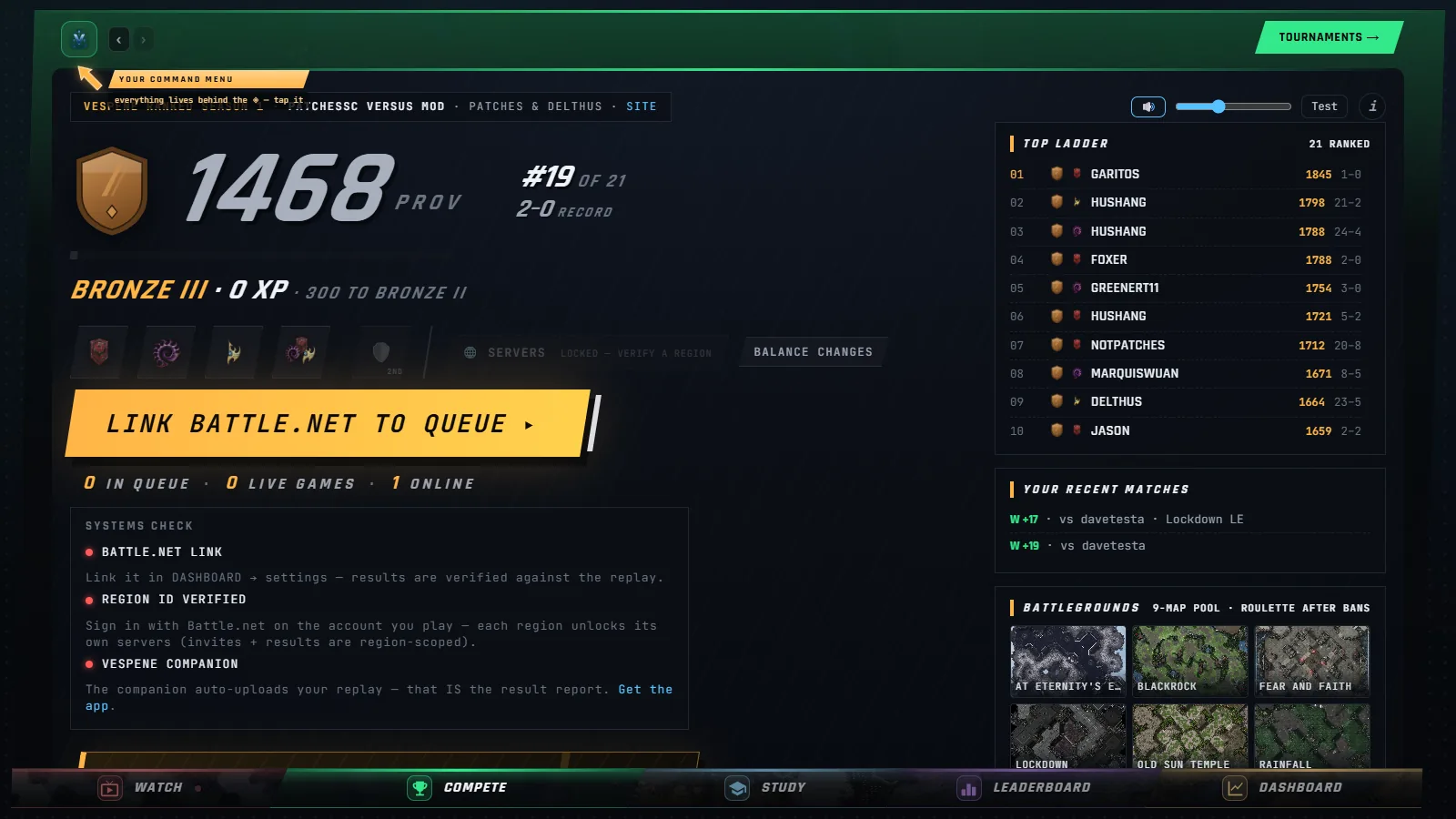
The screen for all of it is the ranked queue screen, also called the War Room. Enter the Compete lane and you land on it, or go straight to /#/tournaments/ladder.
The whole thing in one minute#
- Get ready once. Sign in, link Battle.net, pick a race and your servers. The Companion desktop app is optional. See Your first ranked match.
- Press FIND MATCH. The matchmaker pairs you with the closest player in range and widens the range the longer you wait. See Queueing and matchmaking.
- Match found. A full-screen board appears. Start banning or press READY to show you are there: you get up to four blind bans on a twelve-map pool, then a roulette picks the map from what survives. See Match found and the map draft.
- Meet in SC2. The screen tells you which region to log into, who hosts, which map and which mod. Everyone meets in the
patchesscchat channel. See Hosting, playing and reporting the result. - Play. When the game ends the replay reports the result: the Companion uploads it for you, or either player drops it in by hand.
- Climb. Your rating moves, you earn Clash XP, and a league promotion plays its own cut-in. See Ratings, placement and leagues and Clash XP and the season prize pool.
What makes it different#
- You start where you belong. A new rating is seeded from your own SC2 1v1 MMR, or from the league you tell it if you have no replay on file. A Master player does not grind through Bronze, and a new player is not fed to Masters.
- One rating per race. Your Zerg and your Terran are separate books with separate leagues. Random is rolled to a real race when the match is made, and the result counts for that race.
- Leagues are a share of the field. Grandmaster is the top 2% of ranked books, Master the next 6%, and so on down to Bronze, with every league below Grandmaster split into three sub-ranks. Healthy counts in every league, not just at the top.
- Ranked or unranked. Flip to UNRANKED and you still get fair matches on a hidden rating, with no number and no league on show. Good for trying the mod out or warming up.
- Mirror shield. Set a backup race and a mirror matchup switches one of you off-race, as long as that keeps the game fair. If it would not, it asks you first.
- Blind bans, then a roulette. Both players ban at the same time and cannot see each other's picks, so there is nothing to counter-ban.
- The replay is the referee. No typed scores. Every result is checked against the replay: right map, right mod, right players, played for this match and not an old game. Anything suspicious is held for a moderator. See Fair play: voids, strikes, AFK and disputes.
- The app is optional. Everything works in a browser. The Companion adds automatic replay upload, a queue overlay inside SC2, and a guard that pulls you out of the queue if you start a normal SC2 game. See The Ranked Ladder add-in.
- A season prize pool. Fueled by the community in vespene and paid out in Minerals when the season ends. See Clash XP and the season prize pool.
The screen, piece by piece#
The command bar runs across the top. On the left: your league crest and rating for the race you have selected (click it to open your own player card). In the middle: the RANKED / UNRANKED toggle and your race tiles, with a fifth "2ND" tile for your backup race. On the right: the toolbar doors. On a wide window the doors fold into one settings menu.
The toolbar doors:
| Door | What it opens |
|---|---|
| Servers | Your servers, your ping to each, and a re-measure button. See Servers, regions and ping. |
| Balance changes | The mod's patch notes by race, so you know what differs from retail. |
| Guide & rules | The in-app walkthrough of your first match, the ladder rules and quick fixes. |
| Leaderboard | The whole board, recent replays and the results feed. See Leaderboard, player cards and match history. |
| Map pool | Every map with its art, a short bio and its win rates. See Ladder stats, map pool and balance notes. |
| Ladder stats | The balance report: matchups, maps, vetoes, game length, openings. See Ladder stats, map pool and balance notes. |
| Match sounds | Mute, volume and a test button for the match-found alert. |
The room is the big card under the bar. Its header carries FIND MATCH and the live counters (in queue, live games, online). While you search, a one-row scan strip shows your status, your current search range, the clock and an abort button. Inside are the tabs:
- SETUP appears only while your account setup is incomplete (sign-in, Battle.net link, a verified region), and disappears once everything is green.
- CHAT is the ladder's chat room, which also narrates queue joins, pairings and results. See Ladder chat and the Discord bot.
- LEADERBOARD is the ranked board with league dividers and a search box.
- HISTORY is your own match record, with the buttons to contest a result or report a player.
- REVIEW is visible to moderators only: the games the replay check held.
The prize pool card sits beside the room with the season's total, the payout split and the patrons board.
The Patch Clash ladder at a glance#
| Mod | PatchesSC Versus Mod (or its PTR version, PT: PatchesSC Versus Mod (PTR)) |
| Meet-up channel | patchessc |
| Format | Best of one |
| Map pool | 12 maps: 6 ladder maps and 6 Patch Clash Editions (PCE) |
| Bans | Up to 4 each, blind and simultaneous |
| Servers | US West, US Central, US East, Brazil, Singapore, Australia, Europe, Korea, Taiwan |
| Races | Terran, Zerg, Protoss, Random |
| Placement | 10 games per race |
| Season | Season 1 ends 3 November 2026, 00:00 UTC |
One note from the mod team bears repeating: the Vespene rating and rankings are independent, and they do not count toward the Patch Clash season final.
Every article in this section#
- Your first ranked match: requirements and a step-by-step first game, including how to host in SC2.
- Queueing and matchmaking: races, backup race, ranked and unranked, the search window, what happens while you wait.
- Servers, regions and ping: regions, the ping probe, which servers are on, and how the match server is picked.
- Match found and the map draft: the accept window, the ban board, the roulette and the current map pool.
- Hosting, playing and reporting the result: meeting up, hosting, marking the game started, reporting, draws, forfeits and the debrief.
- Fair play: voids, strikes, AFK and disputes: the replay check, AFK challenges, voids, strikes and lockouts, disputes and reports.
- Ratings, placement and leagues: Elo, seeding, placement, peaks, leagues, sub-ranks and promotions.
- Clash XP and the season prize pool: Clash XP and levels, hype events, and the season prize pool.
- Leaderboard, player cards and match history: the board, player cards, the feed and your match history.
- Ladder stats, map pool and balance notes: the stats door, the map pool door and the balance notes.
- Ladder chat and the Discord bot: the ladder chat, moderation, and the Discord bot for your server.
- The Ranked Ladder add-in: the Ranked Ladder overlay inside StarCraft II.
- Ladder data for organizers and analysts: public data for tournament organizers and analysts.
- Ranked ladder FAQ: the questions people actually ask.